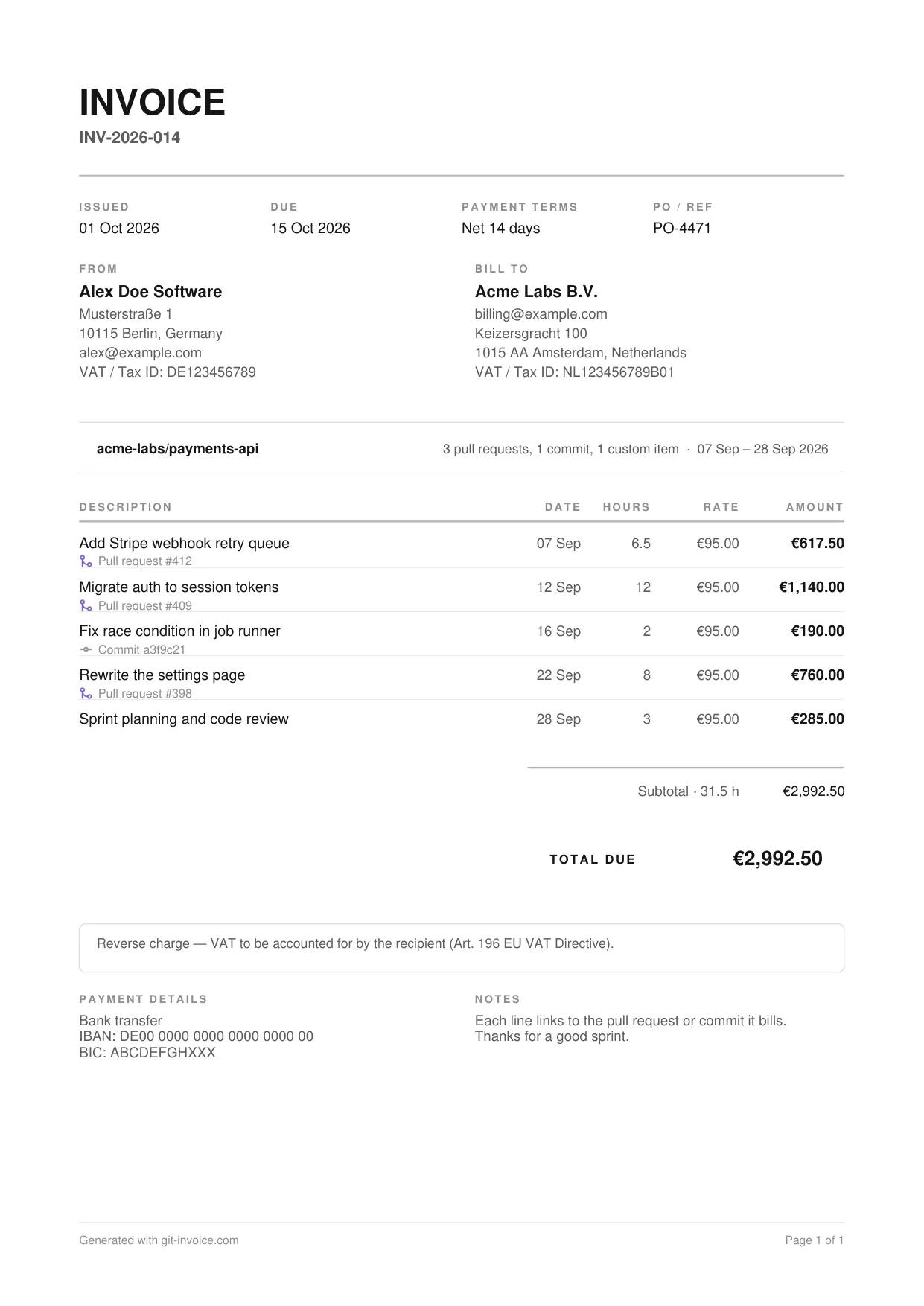
What is on this template
- Invoice number, issue date, due date, payment terms and the client’s PO reference
- Your details and the client’s details, each with a VAT or tax ID
- The repository the work belongs to and the period it covers
- One line per piece of work with date, hours, rate and amount
- Under each line, the pull request number or the short commit hash
- Subtotal with total hours, a tax note, payment details and a note to the client
Why reference pull requests and commits
A client who can open the pull request behind a line does not need to ask what “backend work” meant. The reference turns the invoice into its own evidence: the work was reviewed, merged and dated in a system the client already trusts. It also keeps you honest about scope, because work that never shipped has nothing to point at.
Not everything leaves a trace in git. Planning, calls and reviews of other people’s code go on the invoice as plain lines without a reference, like the last line of the sample.
How to fill it in
- List the work. In the invoice generator you type the lines. In the signed-in app you tick them from your repository.
- Enter hours per line. Git knows what shipped, not how long it took. Log hours while you work or right after merging.
- Set your rate. One hourly rate for the whole invoice is the simplest to read. If you have not settled on one, use the hourly rate calculator.
- Decide the tax treatment. Charge VAT, apply the reverse charge, or state the exemption that applies to you.
- Add payment details and a due date. Bank details or a payment link belong on the invoice itself.
Tax details for cross-border work in the EU
The European Commission lists what a VAT invoice must contain: date of issue, a unique sequential number, the supplier’s and the customer’s name and address, the supplier’s VAT identification number, a description and quantity of the services, the unit price, the VAT rate and the amount payable. When the customer is liable for the tax, the customer’s VAT number and the words “Reverse charge” are required as well (European Commission: VAT invoicing).
The sample shows this case: a German freelancer bills a Dutch company, no VAT is charged, and the note under the total explains why.
Common mistakes
- Lines so vague the client has to ask what they cover
- A reverse-charge invoice without the client’s VAT ID
- No due date, only “payable on receipt” buried in a note
- The same commit billed twice, once on its own and once inside a pull request
- Rounding hours differently from line to line
Other invoice templates
- Hourly invoice template: Time-and-materials invoice: one line per task with date, hours, rate and amount.
- Independent contractor invoice template: Monthly invoice for contract work with purchase order, contract reference and Net 30 terms.
- Web development invoice template: Fixed-price project invoice with one line per deliverable, quantities and 20% VAT.
Questions and answers
How detailed should the lines on a developer invoice be?
Detailed enough that the client can match each line to something they saw ship. One line per pull request or per clearly named task works well. A single line reading “Development, 40 hours” invites questions.
Should I bill per pull request or per day?
Per pull request or task if the client cares what was delivered, per day or week if the contract is for your time. The template supports both: the description is free text and the reference line is optional.
Do I charge VAT to a client in another EU country?
For services sold to a business in another EU member state, VAT is normally accounted for by the customer under the reverse-charge procedure. The invoice then shows no VAT, carries the words “Reverse charge” and lists both VAT identification numbers. Rules for consumers and for clients outside the EU differ, so check your own case with an accountant.
Can I create this invoice from my GitHub history?
Yes. Sign in to Git Invoice with GitHub, choose a repository, tick the pull requests and commits you want to bill and enter the hours. The PDF comes out in this layout, with each reference linked to GitHub.