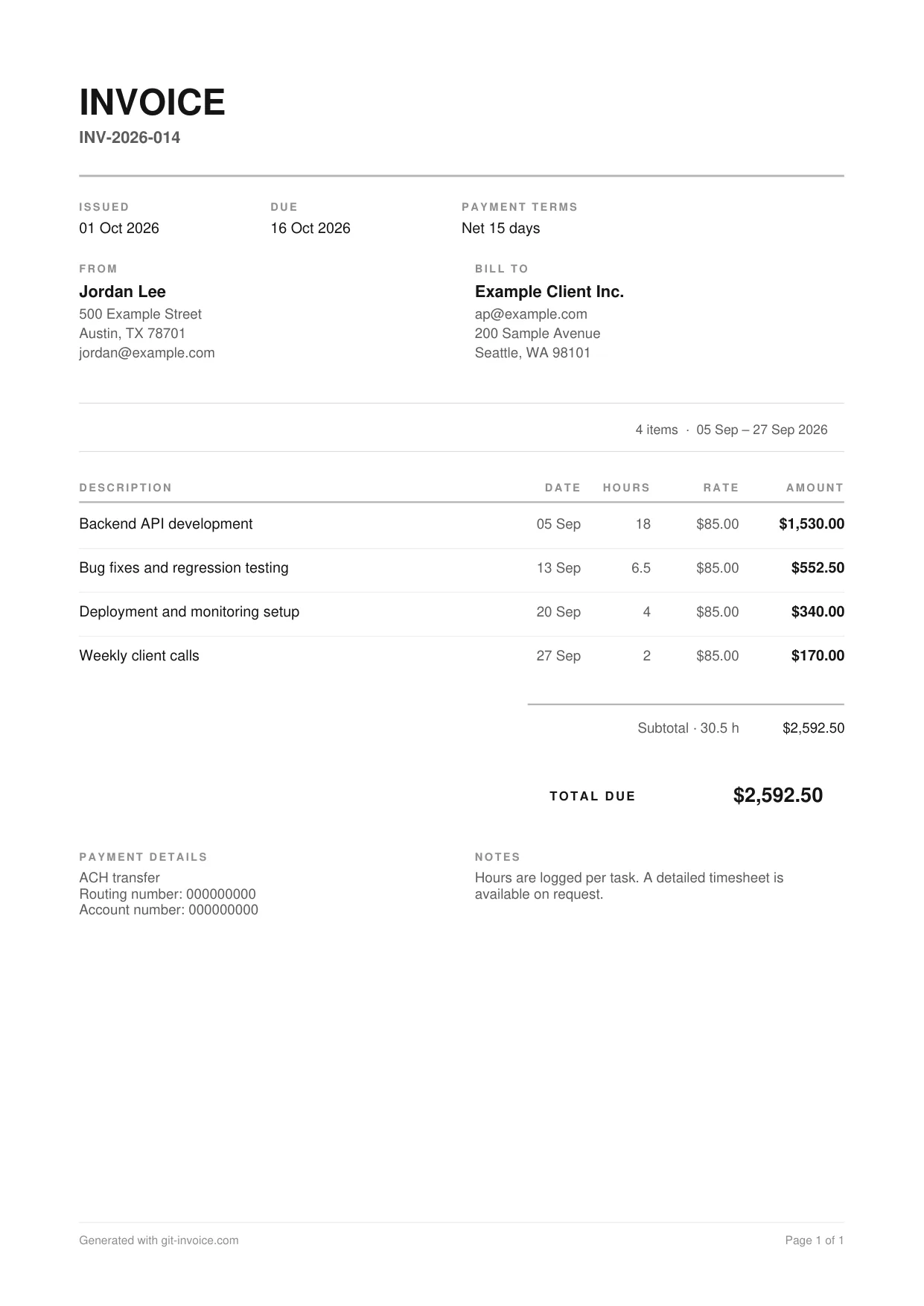
What is on this template
- Invoice number, issue date, due date and payment terms
- Your details and the client’s details
- The period the work covers, taken from the dates of the lines
- One line per task: description, date, hours, hourly rate, amount
- Subtotal with the total number of hours, then tax and the total due
- Payment details and a note to the client
When billing by the hour fits
Hourly billing suits work whose scope moves: maintenance, support, consulting, anything where the client decides week by week what matters most. The client pays for what was done, and you are not left carrying the cost of a changing brief.
For a deliverable with an agreed price, a fixed-price invoice reads better. The web development template shows that layout.
How to fill it in
- One line per task, not per day. “API development, 18 hours” tells the client more than eighteen separate dates.
- Give each line a date. Use the day the task was finished. The invoice derives the billing period from these dates.
- Enter hours in decimals. Six and a half hours is 6.5.
- State the rate on every line. The client should never have to divide to find out what an hour costs.
- Set the due date. “Net 15 days” and the actual date both appear on the PDF.
Open the template in the invoice generator and replace the sample lines with your own.
Keep a record behind the hours
An hourly invoice is only as convincing as the record behind it. Keep a timesheet, or let the work itself be the record: if you write code, the git hours estimator gives you a first estimate from your commit history, and Git Invoice puts the pull requests and commits straight onto the invoice.
Common mistakes
- A single line with a month of hours and no description
- Hours and rate missing, only an amount
- Different rounding from one invoice to the next
- No due date
- Sending the invoice weeks after the work, when nobody remembers the details
Other invoice templates
- Freelance developer invoice template: Hourly invoice whose lines point at pull requests and commits, with an EU reverse-charge note.
- Independent contractor invoice template: Monthly invoice for contract work with purchase order, contract reference and Net 30 terms.
- Web development invoice template: Fixed-price project invoice with one line per deliverable, quantities and 20% VAT.
Questions and answers
How is the amount on an hourly invoice calculated?
Hours multiplied by the hourly rate, per line. The subtotal is the sum of the lines. A discount comes off the subtotal, and tax is calculated on what remains.
Should I round my hours?
Agree on an increment before the work starts and apply it to every line. Quarter hours and half hours are common. The generator accepts any decimal, so 1.25 or 6.5 hours both work.
How often should I send an hourly invoice?
As often as your agreement says. Monthly is the usual rhythm for ongoing work. Shorter cycles mean smaller invoices, which are approved faster and limit what is at risk if a client pays late.
Can different lines have different rates?
Yes. In the invoice generator every line has its own rate, for example a higher one for on-call hours. The signed-in app uses one rate for the whole invoice.